TL;DR at the top of a long post
Three panels that say what four thousand words say. The post stays; the strip is the summary.
Open in playground →toonstrip v0.1.9 · MIT · Astro integration
Write panels, characters, and lines as JSON. toonstrip renders them on real canvases that reflow with the page and read aloud to screen readers. No image exports to keep in sync.
Drag the slider. The strip is not an image: each panel is a canvas, and the column count comes from the container width. Edit this strip in the playground →
30-second install
Install two packages, register the integration, drop the component in a page. The panel on the right is exactly what the snippet renders.
pnpm add @toonstrip/astro @toonstrip/pack-comic-chatnpm install @toonstrip/astro @toonstrip/pack-comic-chatyarn add @toonstrip/astro @toonstrip/pack-comic-chat// astro.config.mjs
import { defineConfig } from "astro/config";
import { toonstrip } from "@toonstrip/astro";
export default defineConfig({
integrations: [toonstrip({ packs: ["@toonstrip/pack-comic-chat"] })],
});---
import { ComicStrip } from "@toonstrip/astro";
---
<ComicStrip
document={{
version: 1,
panels: [{
backdrop: "field",
bodies: [{ character: "dan", emotion: { angle: 0, intensity: 0.8 }, pose: "wave" }],
speakers: [{ speaker: "dan", balloon: "speech", text: "Hello from toonstrip!" }],
}],
}}
packs={["comic-chat"]}
client:visible
/>Result
How it works
{ "backdrop": "field",
  "camera": "medium",
  "bodies": [{ "character": "dan",
               "emotion": { "angle": 0, "intensity": 0.8 } }],
  "speakers": [{ "speaker": "dan", "balloon": "speech",
"text": "Hello!" }] }A Comic Strip Document: panels, who is on stage, what they feel, what they say. Plain JSON with a published schema. No TypeScript required to produce it.
Characters, poses, expressions, and backdrops come from an asset pack. Fifteen characters and three backdrops ship by default; add your own with a sprite sheet and a JSON manifest.
Each panel is its own canvas, sharp at any zoom, re-laid out when the container resizes, and described to assistive tech from the dialogue itself.
Use cases
Every strip below is hand-written JSON, rendered live. Open any of them in the playground.
Three panels that say what four thousand words say. The post stays; the strip is the summary.
Open in playground →A question and an answer read faster with two faces than with a definition list.
Open in playground →A chat thread or interview excerpt, with the room title as the channel name. Lines map straight to balloons.
Open in playground →The document is JSON. Write it by hand, generate it from a script, store it in a CMS field, or have an LLM you call yourself produce it. toonstrip only renders.
Open in playground →npm READMEs, emails, social cards, and OG images can't run a canvas. The CLI renders the same document to a PNG with the same layout and art, so one JSON file feeds both.
Open in playground →npx -p @toonstrip/cli toonstrip render strip.json --out strip.png --width 1200Asset packs
The default pack is the original Microsoft Comic Chat roster, redistributed under MIT. The second pack is one original character and one backdrop: the smallest proof that the pack contract is not tied to the default art.
comic-chat · 15 characters · 3 backdrops
Why not an image?
| Property | Pre-rendered PNG | Exported SVG | toonstrip |
|---|---|---|---|
| Reflows to the container | No. One fixed layout. | Scales, doesn't reflow. | Column count follows width. |
| Sharp on any display | Only at export size. | Yes. | Yes, DPR-aware backing store. |
| Screen readers | One alt text, if you wrote it. | Depends on the export. | Every panel described from its own lines. |
| Change one line of dialogue | Re-render, re-upload. | Re-export. | Edit the JSON. |
| Page weight for a 3-panel strip | One large image. | Text-heavy vector. | Only the sprites it references. |
Where it came from
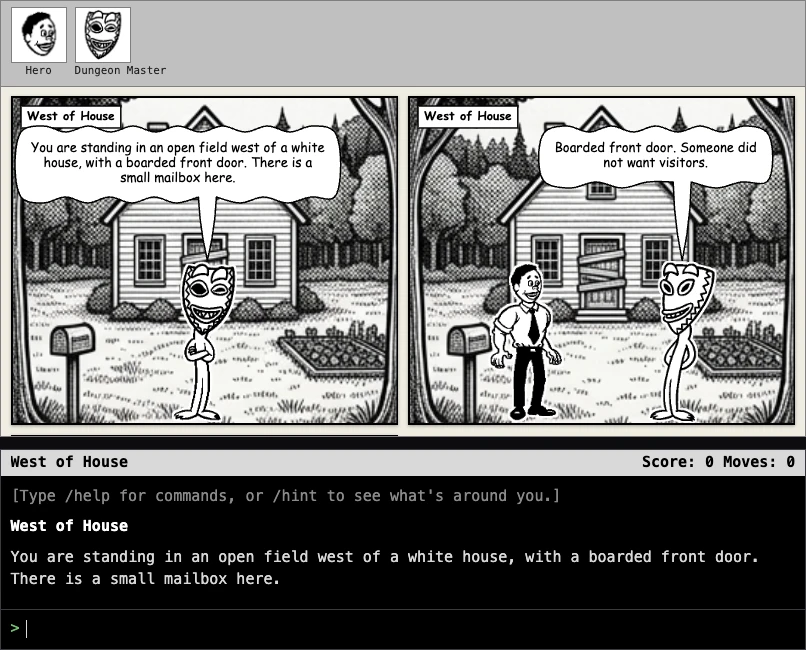
toonstrip started as the comic-rendering half of Grues in Comic, a project that plays classic Zork-style interactive fiction and renders the playthrough live as a Comic Chat-style strip. Panels, poses, and speech balloons are driven by the original Comic Chat engine's own text-to-affect logic, ported as-is with no runtime LLM involved.
That rendering engine (panels, characters, poses, emotions, balloons, backdrops) turned out to be useful on its own, with no game and no Zork coupling attached. toonstrip is that half, pulled out and generalized: same canvas renderer and the same default Comic Chat asset pack, but driven by plain data you supply yourself.
FAQ
No. toonstrip only renders the JSON document you give it — the dialogue, emotions, and direction are yours, your script's, or an LLM you call yourself.
The Astro component emits an inert tag on the server and the browser draws. For static PNGs, the CLI runs the same renderer in Node.
Yes. The code is MIT, and the default pack's Comic Chat art is redistributed under MIT terms.
About 36 KB gzipped for element + core + schema validator; sprite sheets load per character actually used.